

With the Hintaseuranta.fi product feed you can make your online store products appear on the website Hintaseuranta.fi.
The Hintaseuranta.fi product feed is a file automatically generated from the product information of a selected store version, and its content is regularly transmitted to the Finnish Hintaseuranta.fi service.
The Hintaseuranta.fi product feed is part of the MyCashflow Product Feeds extension.
Ordering product feeds
Only an admin account can order product feeds.
Here's how to order a new version-specific Hintaseuranta.fi product feed for the online store:
- Go to the page on the admin panel.
- Press the Hintaseuranta.fi product feeds subheading's Order new product feed button and, if necessary, select the store version whose products you want in the feed.
- Accept the terms of service and press the button.
Once you have completed the order, the feed details and address will be visible on the extension page. You can view the content of the feed by copying the feed URL into the browser's address bar. Note that not all browsers may be able to display large feeds.
Product feed content
The product feed includes information according to the parameters below for all products and variations visible in the store version.
In the feed product listing, parameters may appear in a different order than on this page and are not parsed into groups.
The prefix g for the parameter indicates that the name belongs to the Google Merchant Center namespace.
Basic product information and description
- g:title
- product name according to the product form (for variation products, by default, in addition to the main product name, the variation name according to the product card's Stock tab)
- g:id
- automatically determined product identifier (for variation products, both the main product and the variation identifier)
- g:item_group_id
- variation main product identifier separately (only in variation product information)
- g:link
- Product page URL address
- g:image_link
- Primary product image URL
- g:additional_image_link
- additional image URL (parameter can appear multiple times in the information of the same product.)
- g:description
- Product description and detailed product information
Manufacturer identifiers
- g:brand
- brand
- g:gtin
- EAN code or other GTIN identifier from the stock management settings section Barcode (the series of numbers must comply with the standard)
- g:mpn
- manufacturer's part number from the product form section Product code
- g:identifier_exists
- automatically determined information on the use of manufacturer identifiers
- The value is true if the product information contains at least g:gtin or both g:brand and g:mpn.
- The value is false if there is no manufacturer identifier in the product information or if there is only g:brand or only g:mpn.
Product classification and restrictions
- g:product_type
- product category path in the online store
- g:google_product_category
- Google product category number code
- g:gender
- target customer's gender (selectable from the product form section Search engine optimization , if the product's Google product category is Apparel & Accessories)
- g:age_group
- target customer's age group (selectable as well as gender)
- g:adult
- adult entertainment label
Price and delivery information
- g:price
- price
- g:sale_price
- Campaign price
- g:sale_price_effective_date
- Campaign period
- g:availability
- product availability
- g:availability_date
- availability date
Information determined by product features
The values of the following parameters are based on the product features you have defined:
- g:color
- COLOR
- g:size
- size
- g:material
- material
- g:pattern
- Pattern or graphic printing
- g:condition
- condition class (default new)
- g:product_detail
- additional attribute (parameter can appear multiple times in the information of the same product.)
- g:attribute_name
- additional attribute name
- g:attribute_value
- additional attribute value
- g:custom_label_0
- g:custom_label_1
- g:custom_label_2
- the identifier of the value of the additional attribute using the specified parameter separately.
Using product features to modify the contents of a product feed
With MyCashflow's product features, you can add product information to a feed that the feed does not natively support (such as an environmental certificate granted to the product or the product's inclusion in a specific discount campaign).
When you use product features to define, for example, product environmental certificates, first create a new product attribute using a custom identifier (such as eco_certificate). Activate the Display as product feature on product pages selection in the product attribute settings.
After this, add values to the product attribute with identifiers to specify environmental certificates.
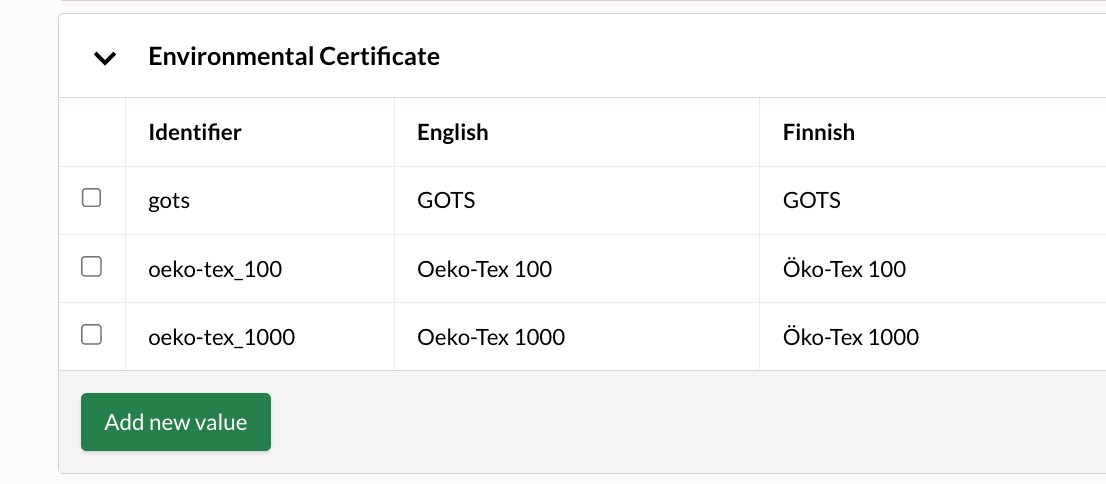
Finally, you can enable the product attribute as a product feature for products or variations. The product feature you specified will appear in the product feed when the feed is updated next time.
Examples
<g:product_detail><g:attribute_name>Environmental certificate</g:attribute_name><g:attribute_value>Öko-Tex 100</g:attribute_value></g:product_detail>- optional identifiers
- identifiers of standard attributes
- custom identifiers
Optional identifiers
An optional identifier for a product attribute is useful when the product feature does not correspond to any standard attribute supported by the product feed. You can format the optional identifier in any way you like (for example, the identifier for the Environmental Certificate attribute could be environmental_sertificate just as well as eco_certificate).
Identifiers of standard attributes
Certain product feed parameters correspond to the identifiers of the feed's standard attributes:
- color
- size
- material
- pattern
- condition
<g:color>blue</g:color>Custom identifiers
If you define a product feature for internal store use only (for example, to group products included in a discount campaign), you can use an a custom identifier as the product attribute identifier:
- custom_label_0
- custom_label_1
- custom_label_2
If a product attribute uses an custom_label identifier, the identifier of the attribute value is also included in the feed as a separate element. As identifiers for attribute values, for example, outlet and spring_2025 would appear in the feed as follows:
<g:custom_label_0>outlet</g:custom_label_0><g:custom_label_1>spring_2025</g:custom_label_1>Updating the product feed
Product feeds are updated automatically once a day in the early morning. Changes made to products in the online store or additions or deletions of products are therefore not immediately visible in the feeds.
You can also update the product feed manually on the admin panel's page by pressing the  button next to the feed to be updated. You can update the feed once every 30 minutes.
Deleting a product feed
Here's how to delete a product feed from a version and terminate the associated advertising:
The advertising associated with the deleted product feed will cease once the ad service's bot next time checks the updates for your product feeds.
