

You can ask your customers for star ratings and free-form text comments, which you can publish on the product pages of your online store. This article discusses managing product reviews.
The customers of your online store can only review the products they have ordered. When an order is marked as delivered, the system sends the customer an automatic review request via email, through which they can access the online store's review page. You can determine yourself the delay time for sending the review request to the customer.
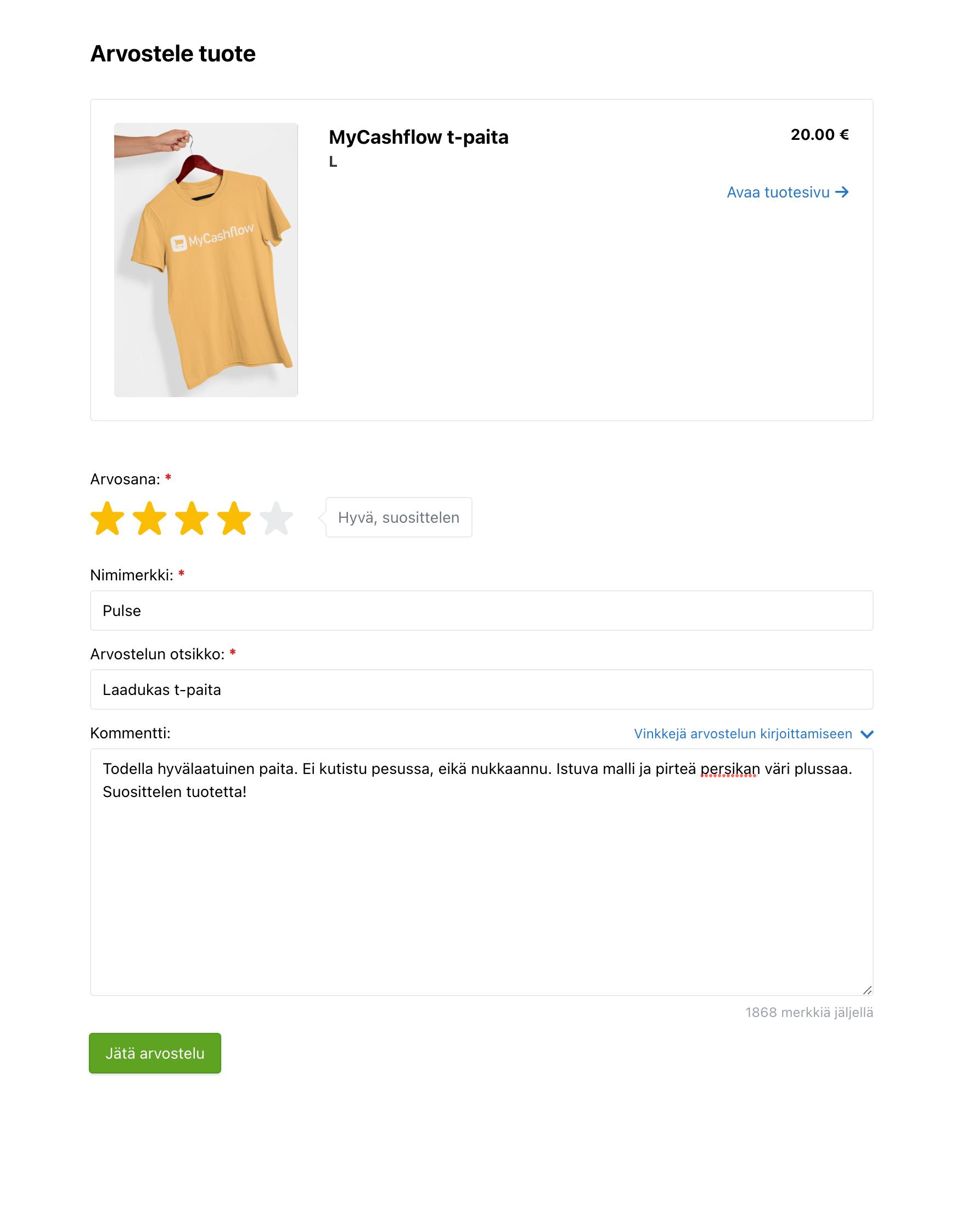
On the review page, the customer can provide star ratings (1–5) and optional comments for the products they have ordered. Based on the star ratings, the system calculates the product's average rating. It is possible to leave reviews anonymously if the customer does not have an account in the online store.
Pricing and availability
Product reviews are a paid add-on service that can be enabled in all paid MyCashflow plans. The cost of the add-on service consists of a monthly fee and a usage-based fee based on the number of events, which is billed retrospectively.
Read more about pricing on the service's presentation page.
Every review request sent to a customer is counted as a product review event, so you can estimate the usage fee based on the number of orders in your online store.
Enabling product reviews
Here's how you can enable product reviews in your online store:
After product reviews have been enabled in your online store, your customers will receive review requests via email after placing an order.
You can moderate the reviews that have arrived in the online store on the admin panel's page.
Settings
You can edit the product review settings by going to the admin panel's page and pressing the Settings button.
The available settings include:
- Enabled in versions: Select which store versions send review requests to customers.
Published product reviews are visible in all store versions where the additional service is enabled.
- Delay in sending review requestDefine how many days after an order is marked as delivered the review request is sent to the customer.
If the delay is 0, the review request will be sent the next morning. Review requests are sent automatically once a day between 7–8 AM.
- Auto-approve rating threshold: Set the minimum rating for publishing product reviews without review. Product reviews that are below the minimum rating must be reviewed individually.
Moderating product reviews
By default, customer product reviews will appear in the online store only after you individually approve their publication. This is how you can ensure that inappropriate content or questions meant for customer service do not end up on product pages.
When you publish a review, it will appear on the online store's product page and become accessible, for example, through Google searches. At the same time, the average of the product's star ratings is updated, and the overall rating based on it is displayed under the main heading on the product page as well as on the product card in the admin panel.
Rejected reviews are also retained on the admin panel's page but are not visible in the online store and do not affect the average star ratings.
You can change the decisions made in moderation at any time on the page by publishing a previously rejected review or by rejecting a previously published review.
Commenting on product reviews
On the page in the admin panel, you can add comments to customer reviews that are shown with the published reviews in the online store.
You can comment on a customer’s product review before or after the review is published. You can add only one comment to each review. Customers cannot respond to your comments.
The use of comments requires that you have added support for it to the theme using the {ReviewResponseComments} tag (please ask the customer service for help editing the theme if you are not familiar with it).
The default theme includes ready support for displaying comments.
The customer is not notified about an added comment. The comment appears below the published product review on the product page in the online store.
After a comment has been added, you can edit it or remove it using the Edit comment function on the admin panel's page.
Adding theme support for product reviews
The content of this section requires you to know how to use HTML/CSS/Interface.
If you are not familiar with modifying the source code of your online store's theme, you can ask our customer service to add support for reviews to your online store.
MyCashflow's default theme includes built-in support for product reviews.
You can collect reviews from customers and access them in the admin panel without making changes to your online store's theme, but displaying the reviews in the store's customer area requires adding the product review Interface tags to the product page template (product.html).
Product reviews and the Finnish Consumer Protection Act
According to the consumer protection law, online stores must provide information on whether the company has verified that the published reviews come from consumers who have actually used the product or made the purchase. Additionally, it must be made clear how this has been verified.
It is forbidden to promote sales by
- submitting fake consumer reviews or endorsements
- buying fake consumer reviews or endorsements
- corrupt consumer reviews or social media recommendations.
In MyCashflow, you have the opportunity to ensure the authenticity of product reviews by carefully moderating them. Also, customers cannot review products they haven't ordered.
You can assert customers that the product reviews are authentic, for example, on one of your store's content pages.
Importing product reviews
If your online store has previously used an external review tool, you can import existing comments and reviews into MyCashflow's product reviews tool. This way, you don't have to start from scratch when enabling MyCashflow's product reviews.
Product reviews collected with MyCashflow's tool automatically come with the Verified buyer mark. If you import product reviews from elsewhere into the system, they won't have the same mark, but you can still publish them on product pages.
