

You can limit the shipping method to be available only within a specific area based on the postal code.
- Finland and the Åland Islands
- The Netherlands
- Belgium
- United States
You can set the restriction to apply to a specific postal code (e.g., 00100 = deliveries only to the center of Helsinki) or a broader postal code area (e.g., 00*** = deliveries to the entire Helsinki area).
If a postal code restriction is set for the shipping method and the customer's postal code is outside the specified area, the shipping method will not appear at the online store checkout.
Enabling a postal code restriction
- Enter a postal code in the shipping method information and press the button.
You can add multiple zip codes for zip code restriction.
To include a wider area in the range, replace part of the postal code characters with * characters. You can allow, for example, the entire Helsinki area with the code 00*** (one * character replaces one digit in the postal code).
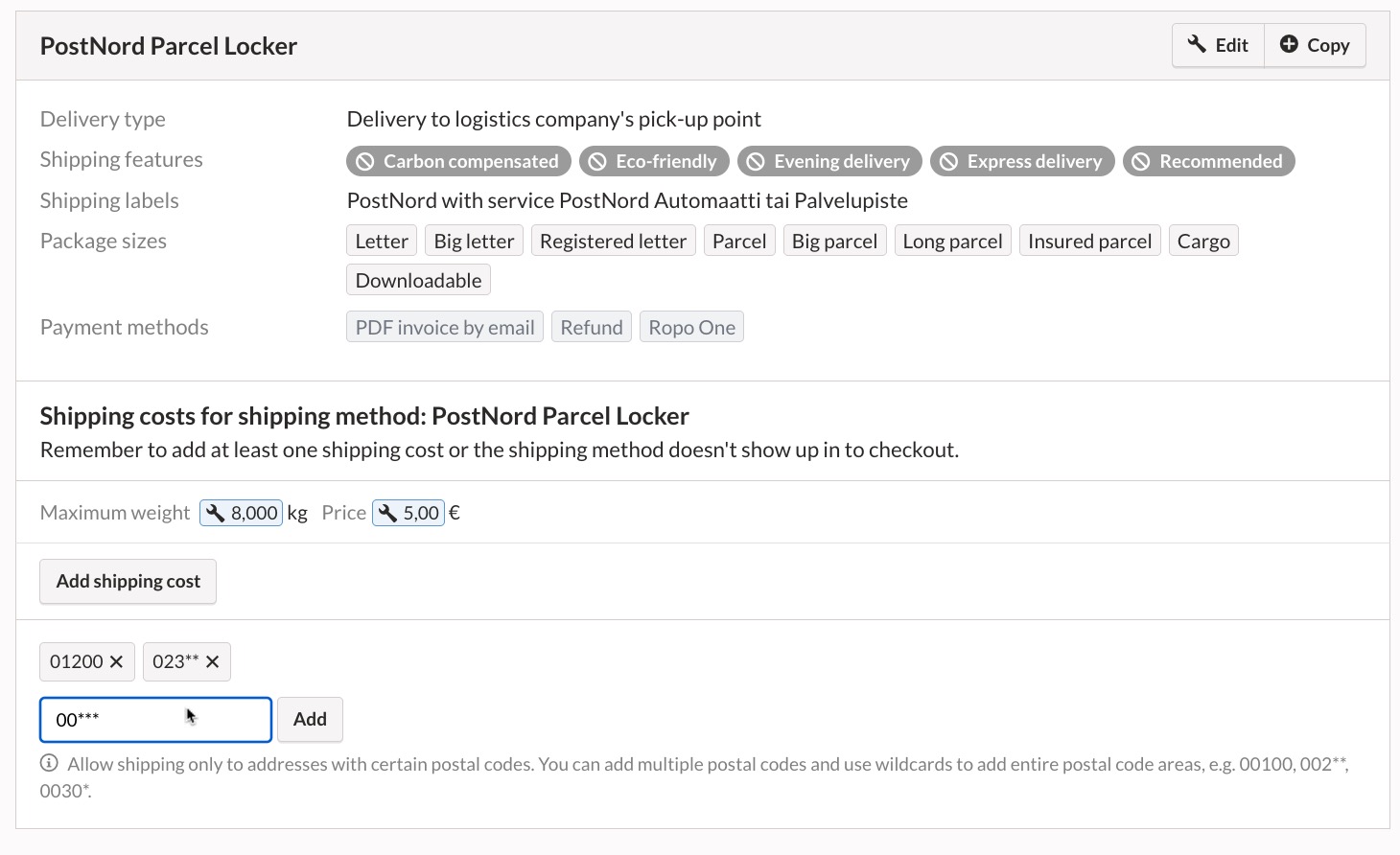
Once you have set the postal code restriction, the shipping method is available only for shipments to the postal code areas you have specified.
Disabling a postal code restriction
 ‑kuvaketta.
If several postal codes have been specified in the restriction and you remove only some of them, customers living in the areas of the removed postal codes will no longer be able to select that shipping method when placing a new order. Disabling the restriction does not affect previous orders.
If you remove all postal codes from the restriction, the shipping method will be applicable in all postal code areas.
