

All online stores must have two legally required documents: terms and conditions and a privacy notice. This chapter of the quick guide explains how they are created in MyCashflow and where to find more information on drafting these texts.
One of the most important features of a good online store is reliability. Customer trust begins to build from having enough information available about your online store and company.
The law requires the online store operator to provide certain information about their company. Carefully review the guidelines from the Finnish Competition and Consumer Authority on the information disclosure obligations of online stores to ensure that your online store is compliant with the law.
Terms and Conditions
Your online store must have public terms and conditions that the customer can read before placing an order. Shipping conditions discuss subjects such as payment and shipping methods and rates, shipping times, returns, and other sales-related topics.
However, the terms and conditions should not be regarded as just a necessary nuisance, as thorough terms and conditions positively impact the customer's purchasing experience: based on the terms and conditions, the online store creates a reliable and professional impression.
MyCashflow includes pre-made terms and conditions, which you can easily modify to create terms suitable for your own online store.
You can edit the terms and conditions in the admin panel on the page at Terms and Conditions.
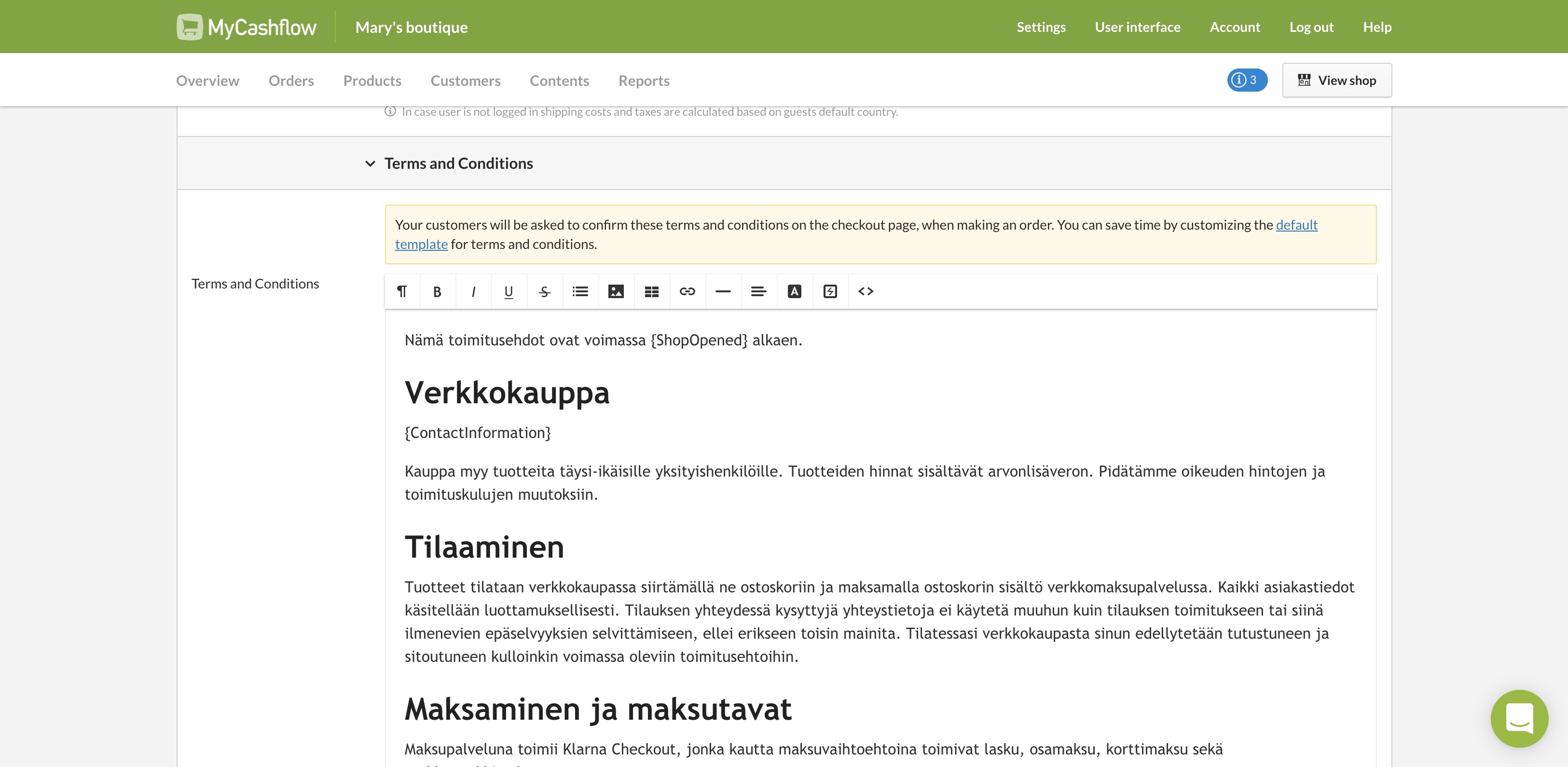
The terms and conditions are also included by default in the online store's content page menu (see quick guide chapter 4), so that they are easily accessible to visitors.
You can find the location of the terms of delivery in the menu on the admin panel' page. The page contains only the tag {TermsAndConditions}, which retrieves the content of the terms and conditions to the page from the aforementioned settings page.
Notable considerations for drafting terms and conditions:
- Edit the content of the terms of delivery only on the page.
Changes or additions to the content of the terms should not be made in the section.
Do not remove or modify the Interface tags, such as
{ShopOpened}and{ContactInformation}.The tags include information stored in the store settings in the text (for example, the aforementioned tags print the store's opening date and contact information), and modifying them may break the terms and conditions in the online store.
- If you do not intend to use Klarna as a payment method in your online store, remove the default mentions of Klarna and replace them with text describing the payment methods of your own online store.
Return policy
The return policy defines the customer's right to return products and receive a refund. Suomessa kuluttajansuojalaki takaa asiakkaalle oikeuden palauttaa tuotteet 14 päivän kuluessa niiden vastaanottamisesta, mikäli tuotteet ovat käyttämättömiä ja alkuperäispakkauksessa. As an online retailer, you must provide a clear and understandable return policy that complies with this law.
MyCashflow online stores include a pre-made return policy that defines the customer's right to return products to the online store.
The return poliy is displayed by default in the order confirmation message, which the system automatically sends to a customer when they place an order.
The return policy may not fully apply as such to the use of your online store. For example, you may want to specify return costs that suit your own purposes.
Here's how you can edit the default return policy:
Privacy notice
In MyCashflow, customers can create user accounts in online stores, which means that your online store will collect and store user details. Because you will process personal data, you must provide a privacy notice in which you'll explain what your online store does to comply with EU's General Data Protection Regulation (GDPR).
You should regard the duty to provide a privacy notice as a positive thing, because all information you provide to your customers will add to your store's credibility, reliability and transparency as well as help you to earn your customers' trust.
It is good to include the following information in the privacy notice:
- openly and clearly, at least the name and contact information of your company and of the data protection officer if you have one, as well as a description of what kind of personal data your company intends to process
- the purpose for which your company processes personal data
- the legal basis for processing personal data
- how long the data will be stored
- other organizations or people who can be given access to the data
- whether personal data are transferred outside the EU
- the data protection rights of an individual
- the right to lodge a complaint with a data protection authority
- the right to withdraw consent at any time if the processing is based on consent
- information about automated decision making and processing-related logic
Source: Tietosuoja.fi
There is no standard template for a privacy notice but you can use the information provided on the Finnish Data Protection Ombudsman's GDPR page to write yours.
You can also use other online stores' privacy notices as models.
In MyCashflow the privacy notice is drafted as a content page:
You can now set the page you created as the privacy notice for the online store:
The page is now visible in the online store at the address https://STORE-NAME.mycashflow.fi/privacy, and it is linked to from all forms that collect personal data (e.g., the checkout customer information form and the store's contact form).
Cookies and cookie survey
- session-specific, so they are automatically deleted after closing the browser or
- persistent, allowing them to remain on the user's device for a certain period of time.
In online stores, cookies are used for many purposes. They help, for example, to remember the contents of the user's shopping cart, track the user's browsing history, and provide personalized recommendations. They are often used for marketing as well, such as displaying targeted advertising.
In the EU, the use of cookies is strictly regulated by data protection legislation, such as the General Data Protection Regulation (GDPR) and the ePrivacy Directive.
Websites must obtain the user's consent before storing cookies on their device, and the user must be provided with clear information about which cookies are used and for what purposes. The user also has the right to refuse the use of cookies or withdraw their consent at any time. Compliance with these regulations is important for online retailers to operate legally and maintain user trust.
MyCashflow offers a cookie survey as an additional service.
The easiest way to implement a cookie consent survey in your online store is to use MyCashflow's Cookie and consent management service. With it, you can have a cookie consent form for your online store that complies with data protection regulations, and you don't have to manage it yourself.
