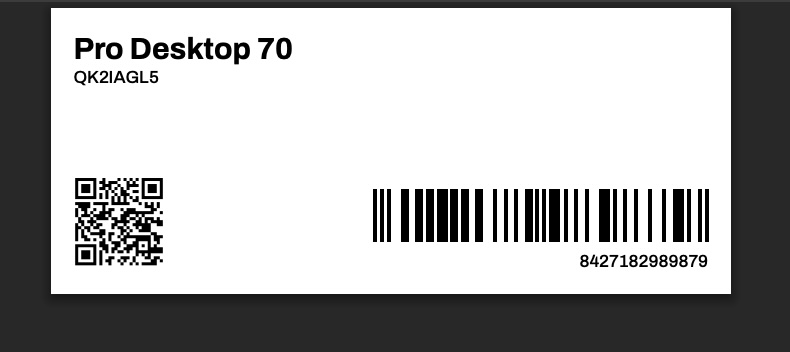
Templates used to format different types of printable product and price labels.
Kuvaus
The PDF theme may include several freely named product label templates, which are placed in the theme's labels/products/ folder. All the templates located in the folder are selectable in the product label printing view in the admin panel.
Also read:
Documentation for the {BarCode} tag- Instructions for using product labels
Sivupohjan ominaisuudet
- Sivupohjan sijainti
- themes/print/THEME/labels/products/*.html
- Sivupohjan URL
- The printouts do not have a URL address.
- Asetettu näkyvyys
- tuote
Toteutus oletusteemassa
Below is an example of the default theme's horizontal price tag labels/products/product-barcode-sticker-40x39mm.html:
<html>
<head>
<meta charset="utf-8">
<title>{ShopName}</title>
<link rel="stylesheet" href="{ThemeUrl}/css/labels-base.css?date=20210304">
<style>
	:root {
		--page-width: 40mm;
		--page-height: 39mm;
		--page-margin: 2mm;
	}

	.TruncateName {
		--font-size-increase: 0;
		--max-rows: 2;
		--max-height: calc((var(--font-size-base) + var(--font-size-increase)) * var(--line-height));
		font-size: calc(var(--font-size-base) + var(--font-size-increase));
		max-height: calc(var(--max-height) * var(--max-rows));
		overflow: hidden;
	}

	.ProductName {
		--font-size-increase: 0.17cm;
		--max-rows: 3;
		font-weight: var(--font-weight-bold);
	}

	.ProductVariationName {
		--font-size-increase: 0.1cm;
		--max-rows: 2;
		font-weight: var(--font-weight-normal);
	}

	.Barcode {
		margin-top: auto;
	}
</style>
</head>
<body>
{Products(
	helper: {{
		<article class="Page PriceTag {ProductClass}">
			<div class="Content">
				<header>
					<h1 class="ProductName TruncateName">{ProductName}</h1>
					{VariationName(
						before: '<p class="ProductVariationName TruncateName">',
						after: '</p>'
					)}
					{ProductCode(
						before: '<p class="ProductCode">',
						after: '</p>'
					)}
				</header>
				<div class="Barcode">
					{Barcode(
						type: 'ean',
						value: '{VariationArticleNumber(or: '{ProductArticleNumber}')}',
						before: '<img src="',
						after: '" style="width: 100%; object-fit: contain;" />'
					)}
					<div class="BarcodeContent">{VariationArticleNumber(or: '{ProductArticleNumber}')}</div>
				</div>
			</div>
		</article>
	}}
)}
</body>
</html>